












































































































































































































































































































































































































































































LAPS
LAPS (Local Administrator Password Solution) is a Microsoft feature in Active Directory environments designed to secure and manage the local Administrator password on domain-joined Windows machines.
By default, many organisations use the same local Administrator password across all machines. If one machine is compromised, attackers can use that password to access others — a lateral movement risk.
LAPS fixes this by assigning a unique, random password to the local Administrator account on each machine, and stores that password securely in Active Directory.
23.4.1 - Enumeration
LAPS can be checked via WinPEAS first and foremost.

23.4.2 - PyLAPS
https://github.com/p0dalirius/pyLAPS
PyLAPS is a Python-based Local Administrator Password Solution (LAPS) tool designed to interact with Microsoft’s LAPS implementation—specifically the new LAPS that stores passwords in Active Directory (AD) attributes like msLAPS-Password.
Note that LAPS uses the same username across all machines. In this example, the user is called 'ladmin' so will likely be that on any other machines.
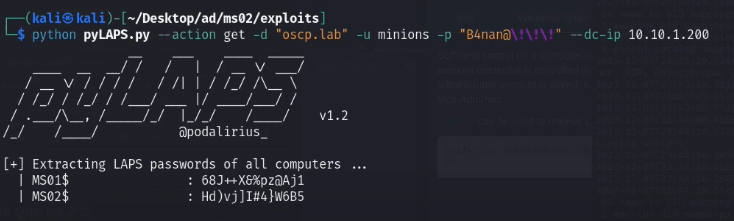
An example of requesting local admin passwords on MS01 & MS02. Note the backslashes to handle the exclamation marks on the password.
Credential Dumping: LAPS
LAPS (Local Administrator Password Solution), a tool designed to manage local account passwords for computers joined to a domain. It securely stores these passwords in Active Directory (AD) and protects them using Access Control Lists (ACLs). Consequently, only authorized users can access or reset them. With LAPS, local administrator passwords on domain-joined computers are automatically managed, ensuring they are unique, randomly created, and safely stored in Active Directory. Since it is built entirely on AD infrastructure, LAPS requires no additional technologies. Moreover, it relies on a Group Policy client-side extension (CSE) installed on managed computers to handle all tasks, and it includes management tools that simplify configuration and oversight.
https://www.hackingarticles.in/credential-dumping-laps/
LAPS rights do NOT show up as group membership in BloodHound by default.
Instead, they show up as:
ReadLAPSPasswordAllExtendedRights- Generic
ReadPropertyon the relevant attribute
Enumerate groups for LAPS password management permissions using Bloodhound, you're looking for AllExtendedRights in this case.
Or check for legacy LAPS with a command (not exhaustive)
Get-ADComputer -Filter * -Properties ms-Mcs-AdmPwd
Enumerate with powerview (again not exhaustive compared to Bloodhound)
Get-DomainObjectAcl -SearchBase "OU=Workstations,DC=corp,DC=local" |
  ? {$_.ObjectAceType -match "ms-Mcs-AdmPwd"}
Extract passwords with this impacket tool
impacket-GetLAPSPassword ignite.local/raj:Password@1 -dc-ip 192.168.1.48